
How to Make Variants in JJS Skill Builder
Variants are one of the best ways to make your custom moves feel more advanced in JJS Skill Builder. Instead of having only one fixed outcome, a move can behave differently depending on timing, hold input, or logic flow.
In this guide, you will learn what variants are, how they work in JJS Skill Builder, and how to build a simple variant structure that you can expand later.
If you are still learning the basics, read our How to Use JJS Skill Builder and How to Make Custom Moves in JJS Skill Builder guides first.
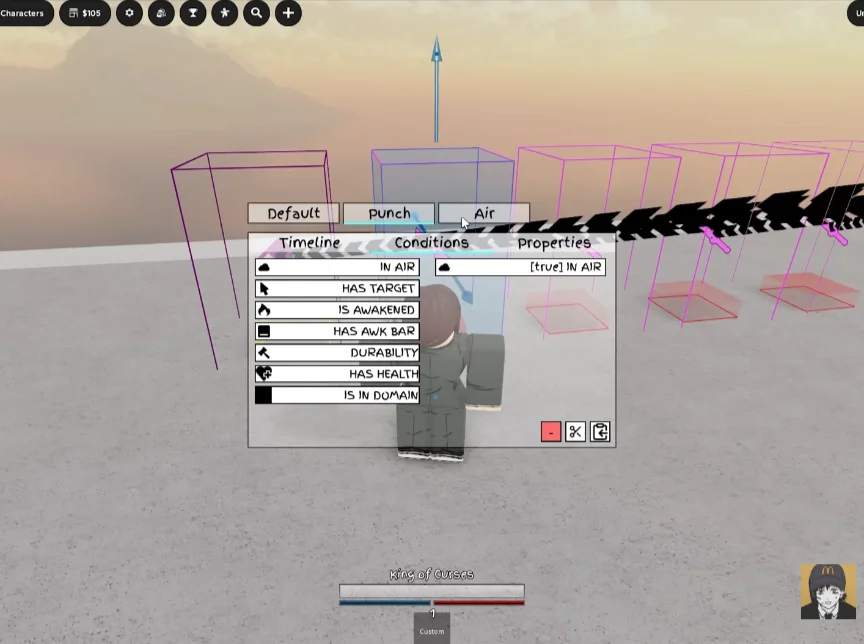
What Are Variants in JJS Skill Builder
A variant is an alternate version of a move.
That usually means:
- one input can lead to different outcomes
- holding or tapping can change behavior
- a move can branch into different paths
- the same skill slot can do more than one thing
Instead of building several disconnected moves, variants let you keep related logic together.
For example, one move might have:
- a quick tap version
- a held version
- a follow-up version
- an alternate finisher
That is what makes variants so useful.
Why Variants Matter
Variants make custom moves feel more complete.
Without variants, many moves feel basic:
- one animation
- one hitbox
- one result
With variants, you can create:
- tap vs hold behavior
- fast vs charged attacks
- different follow-ups
- alternate combo routes
This is one of the clearest ways to make a moveset feel more custom and less repetitive.
The Basic Idea Behind Variant Logic
The easiest way to understand variants is this: one move starts the same way, then splits into different outcomes.
A simple variant structure usually has 3 parts:
That condition can be based on:
- holding input
- timing
- branch logic
- another move state
So variants are not really "extra moves." They are different routes inside the same move structure.
What You Need Before Making Variants
Before building variants, make sure you already understand:
- timelines
- wait timing
- hitboxes — see our Hitbox guide
- animations
- basic move testing
Variants are much easier once you already know how to make one normal custom move. You should also be ready to test the same move many times, because variants often fail due to timing problems rather than missing nodes.
The Main Parts of a Variant Setup
Base Move
This is the shared beginning of the move. Usually this includes startup animation, windup, and a short wait. This section should be common to all versions of the move.
Hold Logic
One of the most common ways to make a variant is to change behavior depending on whether the move is held. This is useful for quick tap attacks, charged versions, and alternate follow-ups.
Branch Logic
Branches decide where the move goes next. This is what allows normal paths, variant paths, failed paths, and follow-up paths.
Separate Outcomes
Each branch should lead to a clear result — different animation, hitbox, damage, knockback, or combo extension.
How to Make a Simple Variant Step by Step
Step 1: Start With One Basic Move
Do not build a complex multi-variant move first. Start with one simple move that already works: startup animation, wait, hitbox, sound. Once that works, then add the variant.
Step 2: Decide What the Variant Changes
Choose one thing only for the first test. Good beginner options:
- tap = quick slash, hold = stronger slash
- normal path = short hit, variant path = extended hit
Step 3: Build the Shared Opening
Create the part both versions will use — animation, short wait, readiness state. This makes your timeline cleaner and easier to debug.
Step 4: Add the Variant Condition
Now add the logic that decides whether the move stays normal or becomes a variant. Common choices: hold input, branch logic, or timing-based split. This is the key point where the move starts behaving differently.
Step 5: Build the Normal Path
Your default path should stay simple:
- normal slash animation
- medium hitbox
- short stun
- light knockback
Step 6: Build the Variant Path
Now create the alternate version:
- stronger animation
- bigger hitbox
- more damage
- more knockback
- longer recovery
The point is not just to make it stronger. The point is to make it meaningfully different.
Step 7: Test Tap vs Hold or Path A vs Path B
Now test both outcomes separately. Check:
- does the correct path trigger?
- is the hold timing reliable?
- does the variant feel too similar?
- is one path clearly better than the other?
If one version is always better, the design needs work.
A Beginner Variant Example
Here is a simple example of how a first variant can work.
Normal Version
Variant Version
Key principle
Stronger outcome should usually cost more time or risk.
How to Make Variants Feel Good
Make the difference obvious
If both versions look and feel the same, the variant adds little value.
Keep shared logic clean
Do not duplicate everything unless necessary. Use a shared opening whenever possible.
Balance risk and reward
If the hold version is stronger, it should usually be slower or easier to punish.
Use animation and sound to separate the paths
Even small changes in animation or sound make variants feel much clearer. Browse our Animation & Sound IDs to find the right IDs for each path.
Common Variant Mistakes in JJS Skill Builder
The variant never triggers
Usually caused by: hold timing is wrong, branch logic is wrong, the move ends too early, or the condition is placed in the wrong spot.
Both versions feel the same
Usually caused by: no meaningful difference in damage, size, or timing, same animation with only tiny stat changes, or no feedback difference.
The variant is always better
Usually caused by: too much damage with no downsides, same speed as the normal version, or no extra recovery or commitment.
The move becomes too messy
Usually caused by: too many branches too early, trying to build several variants at once, or no shared structure in the opening timeline.
When to Use Variants
Variants work especially well for:
- charge attacks
- alternate finishers
- combo extenders
- tap vs hold moves
- special follow-ups
- awakening-style move changes
If a move concept has two related outcomes, it is usually a good candidate for variants.
When Not to Use Variants
Do not force variants into every move. A move does not need a variant if:
- the normal version already feels complete
- the alternate version has no clear purpose
- the logic becomes harder to maintain than it is worth
Sometimes a clean single-path move is better.
How Variants Connect to Other Builder Systems
Variants become much stronger when combined with:
- Hitbox for different damage areas
- Velocity for different knockback behavior
- Branch for alternate routing
- Hit Cancel for conditional outcomes
- Animation and Sound IDs for clearer feedback
That is why variants are one of the best transition points from basic move building into advanced move logic.
Helpful Resources
To build better variants faster, use these resources together:
- Jujutsu Shenanigans codes — study working move ideas and real moveset structures
- Animation & Sound IDs for variant-specific motion and clearer path feedback
- Planner (Beta) to map variant logic before building it in game
Pro tip: Browse our JJS codes collection to find working movesets with multiple paths. Copying and studying a real variant structure is one of the fastest ways to understand how the logic fits together.

FAQ
What is a variant in JJS Skill Builder?
A variant is an alternate version of a move, such as a tap version and a hold version, or a normal path and a branch path.
What is the easiest variant to build first?
The easiest variant is usually a tap vs hold move, where the held version changes damage, timing, or hitbox size.
Should a variant always be stronger?
No. A variant should be different, not automatically better. Stronger outcomes usually need extra startup or recovery.
What should I learn after variants?
After variants, the best next topics are Branch logic, Hit Cancel, and counters.
Conclusion
Learning how to make variants in JJS Skill Builder is one of the best ways to make your movesets feel more advanced. Start with one simple working move, then split it into two clear outcomes. Keep the logic readable, make the difference obvious, and balance risk against reward.
If you want more move ideas before building your own, browse our JJS codes, Animation & Sound IDs, and Planner (Beta).